
Category: Enterprise Desktop Applications, Cross-Platform Development, Point of Sale (POS), Customer Relationship Management (CRM) Tags: #FlutterDesktop #NativePOS #WindowsApp #MacOSApp #SingleCodebase #RetailTech #CRMIntegration
ntroduction: Single Codebase, Native Performance
Traditional Point of Sale (POS) and CRM systems often require maintaining separate software stacks for desktop, mobile, and web. Escape Marchant was developed to eliminate this redundancy by leveraging Flutter Desktop to create a single codebase that compiles natively for both Windows and macOS.
This unified approach delivers the rich, responsive UI and high performance necessary for demanding retail operations and back-office management, all while dramatically reducing maintenance and time-to-market.
🛠️ Project Summary & Technology Stack
| Detail | Description |
| Product | Escape Marchant Desktop POS & CRM |
| Role | Lead Flutter Desktop Architect / Developer |
| Technology | Flutter (Dart), Native Platform Channel APIs (for hardware), SQLite/Local DB (for offline POS), Cloud Synchronization |
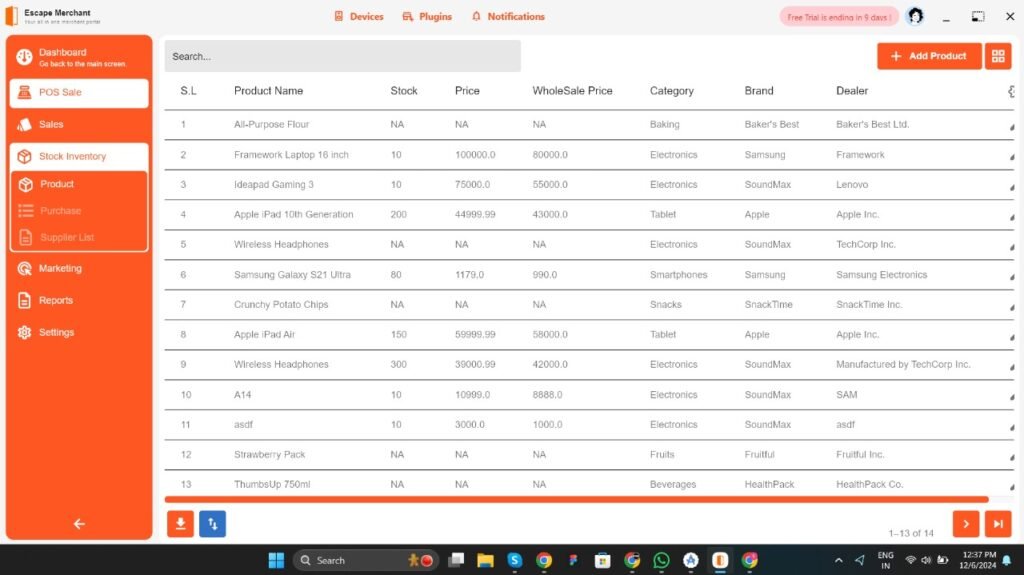
| Key Features | Real-Time POS Terminal, Unified Customer Profiles (CRM), Inventory Management, Hardware Integration (Scanners, Printers) |
| Platform | Windows (Native EXE/MSIX) & macOS (Native DMG/App Store) |
The Core Challenge: Achieving Native Reliability and Deep Integration on Desktop
The primary challenge was ensuring the cross-platform application behaved, performed, and integrated with hardware like a true native desktop application, which is crucial for transactional systems like POS.
1. Robust Desktop Performance and UI/UX
- Problem: Cross-platform solutions often suffer from large binaries, slow performance, or a non-native look-and-feel.
- Solution/Implementation:
- Leveraged Flutter’s Ahead-of-Time (AOT) compilation into native code for exceptional performance, meeting the high Frames Per Second (FPS) requirement necessary for smooth POS checkouts.
- Designed the UI/UX with responsive, adaptive layouts that utilize appropriate visual language components for both Windows and macOS, ensuring a familiar experience for local staff.
2. Hardware Integration and Native APIs
- Problem: POS requires direct, reliable communication with platform-specific hardware (cash drawers, receipt printers, barcode scanners).
- Solution/Implementation:
- Utilized Platform Channels and external Flutter packages (like those for
win32orposixAPIs) to integrate directly with low-level native functionality. - This allowed for secure and reliable control over local USB/Bluetooth peripherals, such as automatically triggering the cash drawer after a successful sale or sending print jobs to a dedicated receipt printer.
- Utilized Platform Channels and external Flutter packages (like those for
3. Unified POS and CRM Workflow
- Problem: Disjointed systems mean sales data is not immediately linked to customer profiles.
- Solution/Implementation:
- The application features an integrated workflow where every transaction initiated in the POS Terminal automatically updates the corresponding CRM Profile.
- Implemented CRM features accessible directly at the point of sale: customer lookup via phone/name, instant application of loyalty rewards, and real-time logging of purchase history—turning transactions into customer relationships.
- Includes real-time inventory tracking, with every POS sale instantly decrementing stock and providing alerts directly on the desktop interface.
4. Offline Resilience for POS Operations
- Problem: The point of sale must continue running even during a network outage.
- Solution/Implementation:
- Integrated a local database system (e.g., SQLite via Flutter’s persistence package) to store all transactional data when offline.
- Implemented a robust data synchronization service that automatically and securely syncs all pending offline transactions with the cloud server as soon as the network connection is restored, ensuring zero data loss and business continuity.
Technical Highlights and Business Value
- Cost Efficiency: Achieved full native deployment on two major desktop OSes using a single development team and codebase, resulting in significant cost savings and faster feature delivery.
- Seamless Omnichannel: The desktop POS forms a seamless part of a wider ecosystem (likely mobile/web), leveraging the CRM data to personalize the retail experience.
- Reliability: Native compilation and local data persistence ensure the mission-critical POS functionality never fails due to network issues.
Conclusion: Mastering Multi-Platform Enterprise Development
The Escape Marchant POS & CRM is a definitive portfolio piece demonstrating expertise in Flutter’s advanced capability as a viable, high-performance platform for enterprise-level desktop applications. We proved that complex business solutions can achieve native quality on Windows and macOS from one unified source.
If your business needs a high-performance, unified application to run your retail or service operations on desktop and beyond, our mastery of the Flutter desktop ecosystem is your core advantage.
You can learn more about how to create high-performing desktop applications with Flutter from the video: Build Great Windows Desktop Apps with Flutter – Setup, Configure, Distribute.